OPNsense®🔗
Overview🔗
Runs on Proxmox so that, in addition to the router OS, other network-related services can also be hosted.
| Function | Description | Additional Info |
|---|---|---|
| LAN Ports | ETH 3 WAN ETH 0-2 LAN | LAN_BRIDGE configured on ports 0-2 |
| DHCP | DNS is AdGuard Home, which in turn uses the Cloudflare DoH server | |
| VPN | Cloudflared Zero Trust | Alpine Linux LXC |
| Packages | Not in use |
Setup🔗
Pve2-netwatch
/etc/default/grub:
GRUB_CMDLINE_LINUX_DEFAULT="quiet intel_iommu=on iommu=pt splash"
Doc unfinished
Issues🔗
Network Slowdown Issue🔗
I have some weird issue where, if a torrent has multiple seeders, the network becomes very slow.
In general, it is recommended to disable Hardware Offloading, so I did that.
My main suspicion is...
Attempt 1🔗
Maybe the cause is Firewall Maximum States, which is set to 404,000 by default.
Firewall > Settings > Advanced
Increased it to 800,000.
It actually seemed to help, the network no longer completely locks up.
Nope, still broken...
Attempt 2🔗
Go to System > Settings > Tunables, add the following values, then reboot:
| Tunable | Value | Description |
|---|---|---|
kern.ipc.nmbclusters | 1000000 | Increases network memory buffers for high-connection scenarios. |
net.inet.rss.enabled | 1 | Enables Receive Side Scaling to spread network load across CPU cores. |
net.isr.dispatch | deferred | Changes how network packets are processed to work effectively with the other net.isr tunables. |
net.isr.maxthreads | -1 | Creates a dedicated network processing thread for each CPU core. |
net.isr.bindthreads | 1 | Binds each network processing thread to its specific CPU core. |
Yeah... still not fixed.
Attempt 3🔗
Tested several more things.
Checked resource usage thoroughly, everything stays below 50%.
While the server was downloading, I tested a different DNS server, same issue.
Changed WAN interface MSS to 1440.
Used a shaper and limited it to 50% of my maximum bandwidth.
Still the same issue.
Still need to test:
1. Ping while the network is "down".
2. Connect directly to the ISP router and check whether a torrent with many seeders still causes other network traffic to slow down.
Come back here after gathering more findings - ChatGPT
Partial answer:
1. I already tried option one, setting Firewall Maximum States higher, currently at 800k, did not help.
2. Also already turned "block bogon networks" off.
3. I have a known good NIC, the i226 and Linux Bridges do not have a firewall check, not that it matters to me, i have passed trough the NIC to the op>
4. I have also already done some sysctl tuning:
kern.ipc.nmbclusters - 1000000
net.inet.rss.enabled - 1
net.isr.dispatch - deferred
net.isr.maxthreads - -1
net.isr.bindthreads - 1
5. Already did that
6. D
WAN Disconnect Issue🔗
The router's WAN NIC dies and is unable to recover on its own. I have to unplug and reconnect the cable multiple times before the WAN finally comes back online.
Already Tried
I have already tried replacing the cable ends and the cables themselves, but the issue remains.
This problem did not occur with my previous TP-Link router.
Attempt 1🔗
Disabling hardware offloading on the WAN NIC seemed to help:
Interfaces > WAN
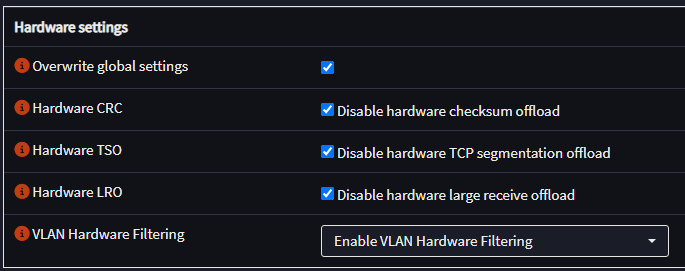
Didn't help :)
Attempt 2: Fixed?🔗
I think I found the issue.
The ISP cable termination is probably faulty and needs to be replaced, because after placing the PoE injector on top of a small box, the problem stopped occurring.
What is strange is that I previously tried pulling and moving the cable around while it was plugged in to see if the WAN would disconnect, but it never did...
Network Diagram🔗
Uses the built-in Mermaid.js support in MkDocs for diagram creation. Diagrams can be quickly tested and created using the Mermaid Live Editor.
%% Cannot use hyphens in names because it causes a syntax error
%% There was a GitHub post about this years ago, they said it was fixed, but it still isn't

architecture-beta
    service ISP(streamline-sharp:cellular-network-5g)[ISP router]
    group network
        %% Network devices
        service switch(clarity:network-switch-line)[Switch] in network
        service router(simple-icons:opnsense)[OPNsense] in network
        service wifiAP(streamline:wifi-router)[TPLink wifi AP] in network
        %% Other network devices
        service tv(iconoir:modern-tv-4k)[TV] in network
        service pc(game-icons:pc)[PC] in network

    group homelab(streamline:database-server-1)[homelab] in network
        service server(simple-icons:proxmox)[Server] in homelab
        junction homelabC in homelab

            service arr_stack(simple-icons:docker)[Arr Stack] in homelab
            service vm_player(simple-icons:kodi)[VM Player] in homelab
            service vm_drops(simple-icons:twitch)[VM TDrops] in homelab

    ISP:B --> T:router

    %% Network
    router:L --> R:switch
    router:B --> T:wifiAP

    %% Homelab
    wifiAP:L --> R:server{group}
        server:L -- R:homelabC
        %% Homelab junction
        homelabC:B --> L:arr_stack
        homelabC:L --> R:vm_player
        homelabC:B --> R:vm_drops

    %% Other network devices
    wifiAP:B --> T:tv
    switch:L --> R:pc