Jellyfin🔗
Jellyfin is a free media system that puts you in control of managing and streaming your media. It is an alternative to Emby and Plex, serving media from a dedicated server to end-user devices via multiple client applications.
Additionally, an AMD iGPU passed through from the Proxmox host is used to improve Trickplay generation times and reduce CPU usage. You can use this same guide to pass a dGPU through to an LXC container as well.
Configuration🔗
Jellyfin compose
# Jellyfin
jellyfin:
    image: lscr.io/linuxserver/jellyfin:latest
    container_name: jellyfin
    devices:
    - /dev/dri/renderD128:/dev/dri/renderD128 # AMD iGPU from Proxmox host
    environment:
    - PUID=0
    - PGID=0
    - TZ=Europe/Tallinn
    group_add:
    - "108" # render group
    - "44" # video group; we don't map the 'video' group from the host into the LXC since the 'render' group is primarily what's needed for transcoding. Adding the 'video' group in Docker is just a fallback, though access to 'card' devices might be restricted.
    volumes:
    - ./jellyfin:/config
    - ./media/movies:/movies
    - ./media/tv-shows:/tv-shows
    ports:
    - 8096:8096
    cpus: '2.0' # so this shit doesn't kill the entire LXC when ffprobe or a library scan runs...
    mem_limit: 5G # memory limit so the cache doesn't grow indefinitely
    restart: unless-stopped
GPU Utilization🔗
First off, please note that this setup uses an unprivileged LXC container.
Proxmox Host🔗
Check if Proxmox can detect the AMD iGPU:
lspci -nnk | grep -EA3 'VGA|3D|Display'
It should indicate that the amdgpu driver is in use.
Check the device filename:
ls -l /dev/dri
Files that start with c in the permissions table and belong to the render and video groups are the correct ones.
renderD128 should be the filename if no other GPUs are connected:
# ls -l /dev/dri
total 0
drwxr-xr-x 2 root root         80 Mar  8 00:40 by-path
crw-rw---- 1 root video  226,    1 Mar  8 02:06 card1
crw-rw-rw- 1 root render 226, 128 Mar  8 00:40 renderD128
Install drivers:
apt update
apt install mesa-va-drivers vainfo -y
If you are dealing with an older device, you might also need to install va-driver-all.
Verification:
vainfo --display drm --device /dev/dri/renderD128
Just running vainfo would usually suffice, but for a headless server, specifying the parameters is better. Note: You actually need to reboot after installation, otherwise it might not display the correct info, but you can leave this step for last.
Get the render group ID on both the Proxmox host and within the LXC container: getent group render
Proxmox returned 104, LXC returned 108
Note: Replace these numbers with your own getent group render output! Give the Proxmox root user permission to map host GID 104 into the container: echo "root:104:1" >> /etc/subgid
If this line already exists, do not duplicate it.
You can verify it with:
grep root /etc/subgid
Based on the group IDs, add the following information to your LXC config file:
nano /etc/pve/lxc/YOUR_LXC_ID.conf
# --- GPU Passthrough Configuration ---
lxc.cgroup2.devices.allow: c 226:128 rwm
lxc.mount.entry: /dev/dri/renderD128 dev/dri/renderD128 none bind,optional,create=file

# Example with the whole folder passed through; not used because file mount is more precise and safer.
# lxc.cgroup2.devices.allow: c 226:* rwm
# lxc.mount.entry: /dev/dri dev/dri none bind,optional,create=dir

# --- ID Mapping for Host(104) to LXC(108) ---
lxc.idmap: u 0 100000 65536

# 1. Map Container GIDs 0-107 to Host 100000-100107
lxc.idmap: g 0 100000 108

# 2. Map Container GID 108 (render) to Host GID 104 (render)
lxc.idmap: g 108 104 1

# 3. Map Container GIDs 109-65535 to Host 100109-165535
lxc.idmap: g 109 100109 65427
Jellyfin LXC🔗
Install drivers:
apt update
apt install mesa-va-drivers vainfo -y
Get the video group ID:
getent group video
For Debian/Ubuntu, video is usually 44.
Add the devices and group_add parameters to your Jellyfin compose file:
devices:
      - /dev/dri:/dev/dri
group_add:
      - "108" # render group
      - "44" # video group; we don't map the 'video' group from the host into the LXC since the 'render' group is primarily what's needed for transcoding. Adding the 'video' group in Docker is just a fallback, though access to 'card' devices might be restricted.
Restart the LXC container, as the driver installation requires it.
Verify if it works:
docker exec -it jellyfin /usr/lib/jellyfin-ffmpeg/vainfo --display drm --device /dev/dri/renderD128
If it prints out various codecs, you are good to go.
If you want to be 100% sure, install the radeontop app on Proxmox, trigger a Trickplay generation or Transcode in Jellyfin, and enter the following in the Proxmox shell:
radeontop
Troubleshooting🔗
If it doesn't work for some reason, try the following suggestions:
- Grant access permissions (I'm not entirely sure if this is mandatory):
chmod 666 /dev/dri/renderD128 - If Proxmox refuses to use the iGPU, it might help to add
amdgputo the modules config file:
echo "amdgpu" >> /etc/modules-load.d/amdgpu.conf
Or if you aren't using a root account:
sudo sh -c 'echo "amdgpu" >> /etc/modules-load.d/amdgpu.conf'
After a reboot, the lspci command should output "kernel driver in useamdgpu. - I dunno :)
Via the Jellyfin WebUI🔗
Doc in progress
Transcoding🔗
In Jellyfin, go to Dashboard > Playback > Transcoding.
Enable Hardware acceleration and select VAAPI.
Set the VAAPI device to renderD128 and enable all codecs supported by your device.
Most modern setups should support everything. AV1 support is only available on newer cards (RDNA2/3 architectures).
Check the box for "Enable hardware encoding".
I didn't mess with the other settings, but you can:
Test things out and maybe lower the H.265 / 264 CRF value.
Check the box to enable "Allow subtitle extraction on the fly".
Trickplay🔗
In Jellyfin, go to Dashboard > Playback > Trickplay.
Enable the first two checkboxes:
"Enable hardware decode"
"Enable hardware accelerated MJPEG encoding"
Additionally, you can check the next box if you want things to process faster when you have a massive library of movies/shows:
"Only generate images from key frames"
I also recommend changing the "FFmpeg Thread" number at the very bottom. My LXC is allocated 8 threads and Jellyfin is given 2 cores (which should include threads, meaning 4 threads total?).
If you leave this at 0, it will utilize everything it can get its hands on and could choke the LXC.
Custom CSS Settings🔗
Read Before Proceeding
Custom CSS code breaks constantly.
If something glitched out, most of the time a simple page reload or app refresh will fix it.
Backdrops make it look nicer
An account-specific setting must be enabled! It works without it, but it looks much cleaner this way.
Settings > Display > Libraries > Backdrops
Since this setting is a bit buggy and occasionally disables itself, I use a plugin to force it.
Abyss-Jellyfin
Project page - https://github.com/AumGupta/abyss-jellyfin
However, customization was done via their web utility - https://aumgupta.github.io/abyss-jellyfin/#customise
@import url('https://cdn.jsdelivr.net/gh/AumGupta/abyss-jellyfin@main/abyss.css');

/* Accent colour
Format: R, G, B  (no rgb() wrapper)
Used for highlights, active states, progress bars. */
:root {
    --abyss-accent:    255, 100, 120;
    --abyss-radius:    12px;
    --abyss-indicator: 55, 55, 55;
}

/* Custom font: Import any Google Font and override body. */
@import url('[https://fonts.googleapis.com/css2?family=Inter:wght@400;500;600&display=swap](https://fonts.googleapis.com/css2?family=Inter:wght@400;500;600&display=swap)');

body {
    font-family: "Inter", sans-serif;
}
Alternatives🔗
Ultrachromic
CSS sourced from here > https://github.com/CTalvio/Ultrachromic along with a few of my own tweaks:
/* Ultrachromic by CTalvio */

/* Recommended */
@import url('[https://cdn.jsdelivr.net/gh/CTalvio/Ultrachromic/fixes.css](https://cdn.jsdelivr.net/gh/CTalvio/Ultrachromic/fixes.css)');
@import url('[https://cdn.jsdelivr.net/gh/CTalvio/Ultrachromic/jf_font.css](https://cdn.jsdelivr.net/gh/CTalvio/Ultrachromic/jf_font.css)');

/* Required */
@import url('[https://cdn.jsdelivr.net/gh/CTalvio/Ultrachromic/base.css](https://cdn.jsdelivr.net/gh/CTalvio/Ultrachromic/base.css)');
@import url('[https://cdn.jsdelivr.net/gh/CTalvio/Ultrachromic/accentlist.css](https://cdn.jsdelivr.net/gh/CTalvio/Ultrachromic/accentlist.css)');

/* Rounding */
@import url('[https://cdn.jsdelivr.net/gh/CTalvio/Ultrachromic/rounding.css](https://cdn.jsdelivr.net/gh/CTalvio/Ultrachromic/rounding.css)');

/* Smaller cast list */
@import url('[https://cdn.jsdelivr.net/gh/CTalvio/Ultrachromic/smallercast.css](https://cdn.jsdelivr.net/gh/CTalvio/Ultrachromic/smallercast.css)');

/* Compact episode list */
@import url('[https://cdn.jsdelivr.net/gh/CTalvio/Ultrachromic/episodelist/episodes_grid.css](https://cdn.jsdelivr.net/gh/CTalvio/Ultrachromic/episodelist/episodes_grid.css)');

/* Transparent top bar */
@import url('[https://cdn.jsdelivr.net/gh/CTalvio/Ultrachromic/header/header_transparent.css](https://cdn.jsdelivr.net/gh/CTalvio/Ultrachromic/header/header_transparent.css)');

/* Login screen */
@import url('[https://cdn.jsdelivr.net/gh/CTalvio/Ultrachromic/login/login_minimalistic.css](https://cdn.jsdelivr.net/gh/CTalvio/Ultrachromic/login/login_minimalistic.css)');

/* Input fields */
@import url('[https://cdn.jsdelivr.net/gh/CTalvio/Ultrachromic/fields/fields_border.css](https://cdn.jsdelivr.net/gh/CTalvio/Ultrachromic/fields/fields_border.css)');

/* Watched / Unwatched indicators */
@import url('[https://cdn.jsdelivr.net/gh/CTalvio/Ultrachromic/cornerindicator/indicator_corner.css](https://cdn.jsdelivr.net/gh/CTalvio/Ultrachromic/cornerindicator/indicator_corner.css)');

/* Skin type */
@import url('[https://cdn.jsdelivr.net/gh/CTalvio/Ultrachromic/type/dark_withaccent.css](https://cdn.jsdelivr.net/gh/CTalvio/Ultrachromic/type/dark_withaccent.css)');

/* Title page */
@import url('[https://cdn.jsdelivr.net/gh/CTalvio/Ultrachromic/titlepage/title_banner-logo.css](https://cdn.jsdelivr.net/gh/CTalvio/Ultrachromic/titlepage/title_banner-logo.css)');

/* Progress bar */
@import url('[https://cdn.jsdelivr.net/gh/CTalvio/Ultrachromic/progress/floating.css](https://cdn.jsdelivr.net/gh/CTalvio/Ultrachromic/progress/floating.css)');

/* Style backdrop (personal: removed blur) */
.backdropImage {filter: saturate(120%) contrast(120%) brightness(40%);}

/* Login background not used because the image is 1080p, jellyfin will not handle it well */

/* Accent and rounding */
:root {--accent: 98, 121, 205;}
:root {--rounding: 12px;}

/* Remove the default play button from the middle of the image!!! */
.cardOverlayButton.cardOverlayButton-hover.itemAction.paper-icon-button-light.cardOverlayFab-primary,
.listItemImageButton.itemAction.paper-icon-button-light{
    display:none;
}
Elegant fin
CSS sourced from here - https://github.com/lscambo13/ElegantFin
/* Elegantin Skin */
@import url("https://cdn.jsdelivr.net/gh/lscambo13/ElegantFin@main/Theme/ElegantFin-jellyfin-theme-build-latest-minified.css");

/* Elegantin Media Bar Plugin */
@import url("[https://cdn.jsdelivr.net/gh/lscambo13/ElegantFin@main/Theme/assets/add-ons/media-bar-plugin-support-latest-min.css](https://cdn.jsdelivr.net/gh/lscambo13/ElegantFin@main/Theme/assets/add-ons/media-bar-plugin-support-latest-min.css)");

/* Material Icon for LG + Some other Effects like Hover Change Layout of button.. */
:root{
--overlayPlayButtonPosition: 50%;
--cardHoverEffect: none;
--extraCardButtonsVisibility: block;
--iconPack: 'Material Icons';
}
Plugins🔗
Plugin Repositories🔗
The plugins I run require these manifests:
Jellyfin Stable (Official plugins):
https://repo.jellyfin.org/files/plugin/manifest.json
File Transformation plugin (Required):
https://www.iamparadox.dev/jellyfin/plugins/manifest.json
Jellyfin-enhanced (Requires the prerequisite dependency plugin):
https://github.com/n00bcodr/Jellyfin-Enhanced
Jellyfin Tweaks (Used for Force Enable Backdrops):
https://raw.githubusercontent.com/n00bcodr/JellyfinTweaks/main/manifest.json
Plugins to Install🔗
-
General
- Chapter Segments Provider
- Custom Tabs
- DLNA - Not entirely sure if it's strictly needed
- File Transformation
- Home Screen Sections
- Jellyfin Tweaks
- JellyfinEnhanced
- Kodi Sync Queue
- Media Bar
- Playback Reporting
- Plugin Pages
- Reports
- Session Cleaner
- Simkl - Optional tracking service
- Trakt - Optional tracking service
- Transcode Killer
-
Metadata
- AniDB
- AniList
- AniSearch
- Artwork
- Fanart
- Kitsu
- Open Subtitles - Requires account, replaced with Bazarr
- TMDb Box Sets
- TVmaze
- TheTVDB
- Plugin Configuration (Alphabetical Order)
- AniDB
- AniList
- AniSearch
- Custom Tabs
Plugin Configuration (Alphabetical Order)🔗
- AniDB
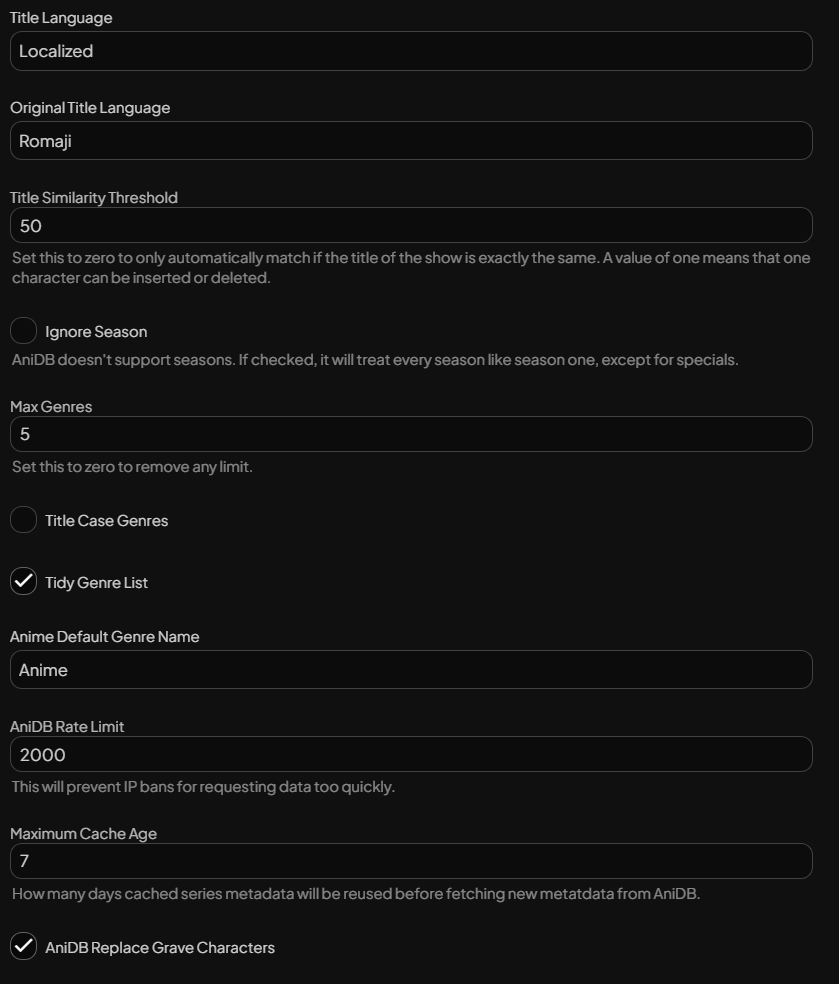
- AniList
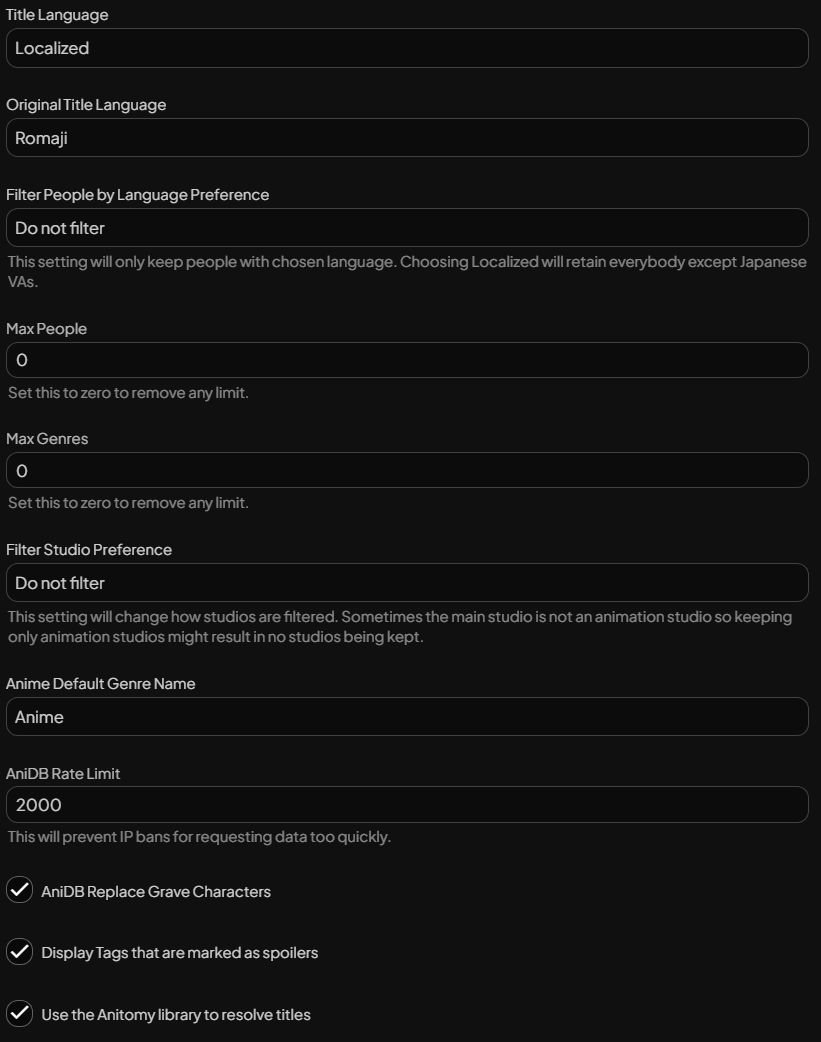
- AniSearch
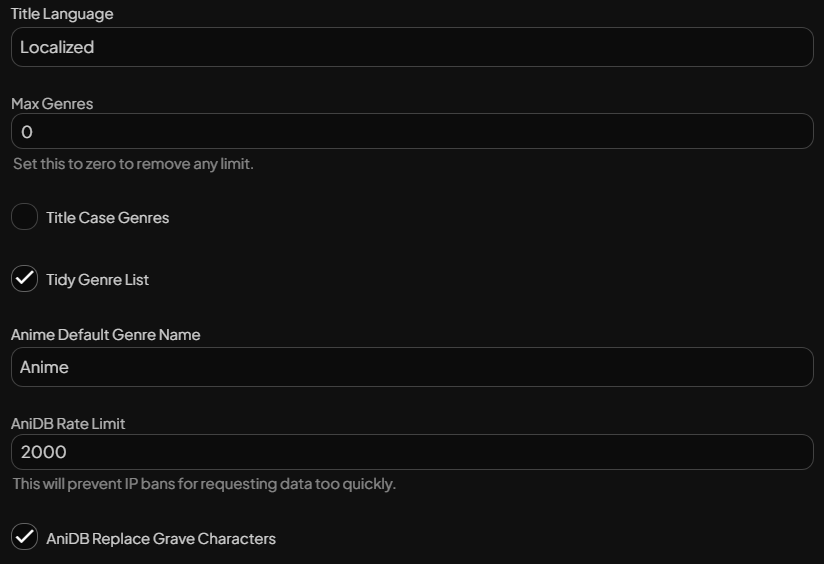
- Custom Tabs
Display Text:
> Requests
HTML content:
- Jellyfin Tweaks
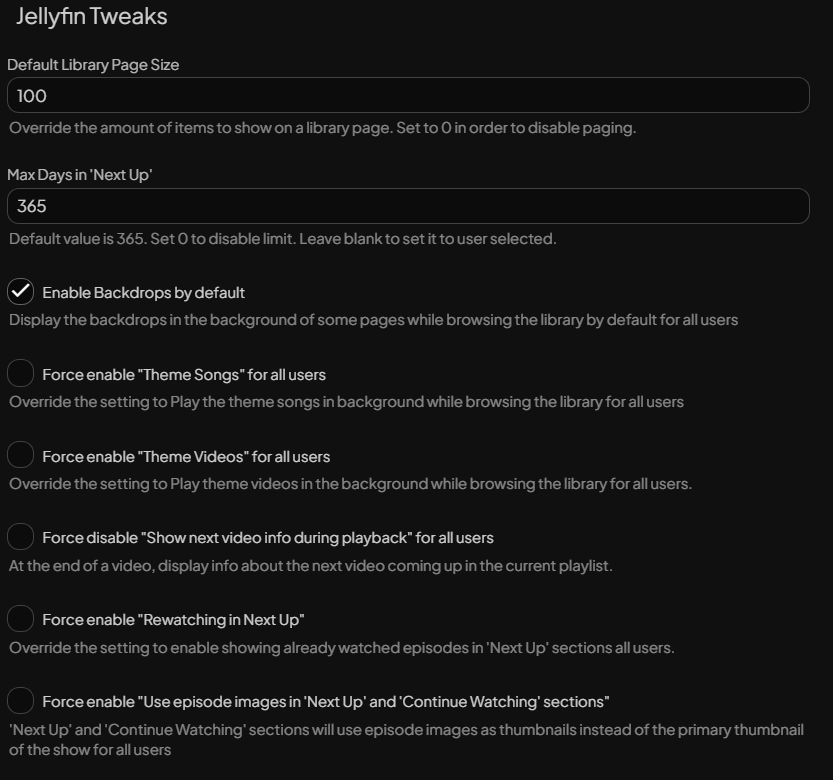
- OMDb
Turn on - Open Subtitles
An account is needed if you intend to download subtitles through them, but I've migrated to Bazarr. - Session Cleaner
30 days - TheTVDB
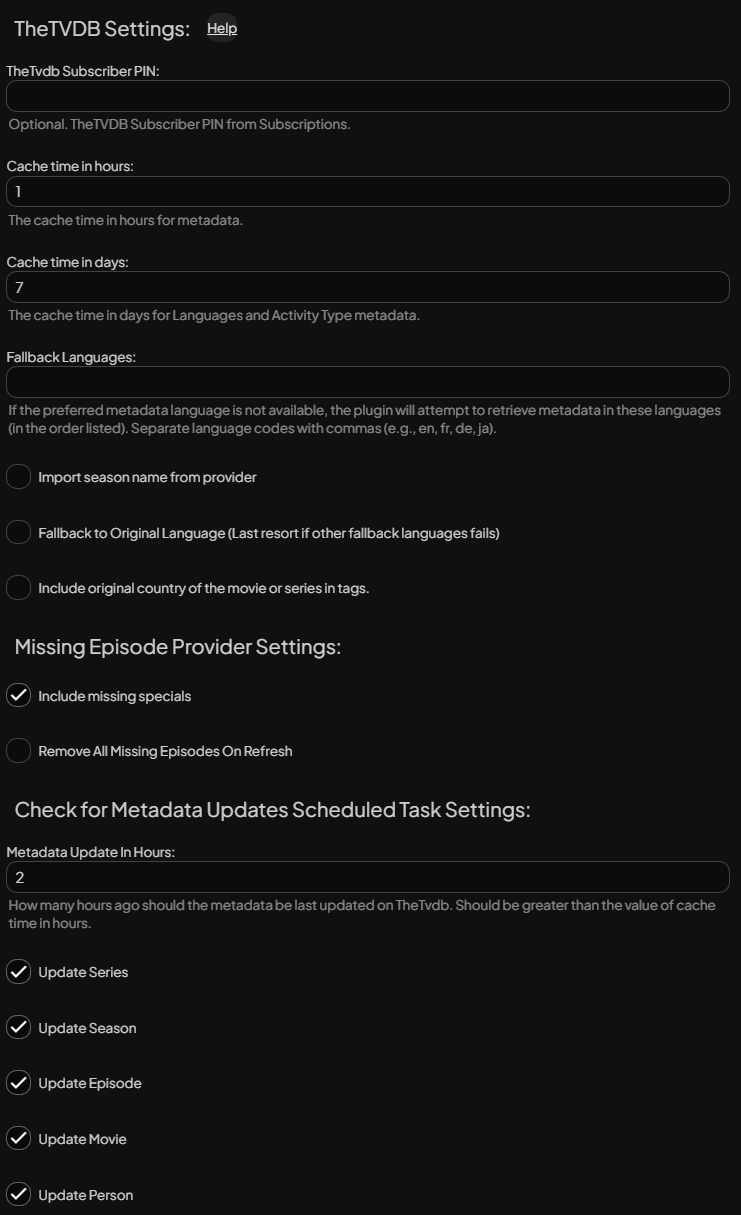
- Transcode Killer
Changed resolution threshold down to 1x1, which might help kill a transcode session if it initiates when it shouldn't.